
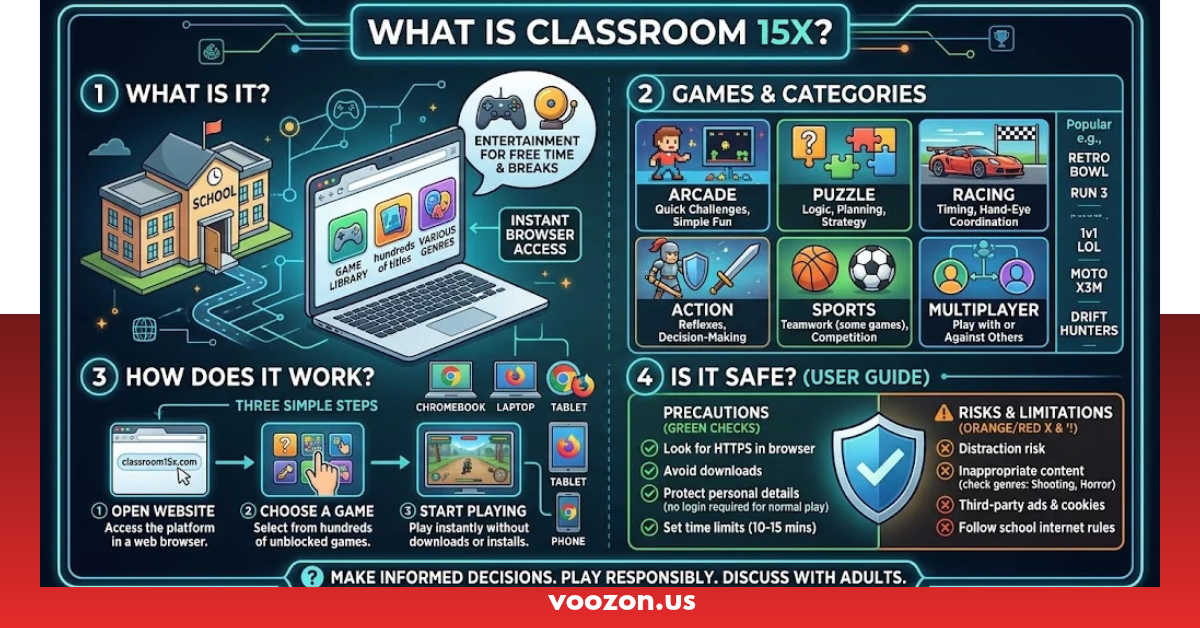
Finding a quick and entertaining game during a break can be difficult when a school computer has limited storage or strict software restrictions. Downloading games also takes time and may create unnecessary security concerns. Classroom 15x offers a browser-based gaming experience where visitors can explore different game categories without installing traditional desktop gaming software. Its collection includes arcade, racing, puzzle, sports, and other casual games, making it an option for people looking for simple entertainment during their free time.
What Is Classroom 15x and Why Do People Use It?
Classroom 15x is an online gaming website that presents a collection of free browser games. Visitors can explore available titles and select games directly from the website.
The platform focuses on convenient access rather than requiring users to install a large gaming application. This makes browser gaming useful for people who prefer quick entertainment on computers and compatible mobile devices.
Its website lists several gaming categories, including:
- Arcade games
- Sports games
- Racing and driving games
- Puzzle games
- Adventure games
- Shooting games
- Simulation games
- Idle and clicker games
- Multiplayer games
- Funny and casual games
The selection gives visitors different ways to spend their free time. Someone who enjoys solving problems can choose a puzzle, while racing fans can explore driving games.
How Does Classroom 15x Work?
The website uses a browser-based gaming format. Instead of installing a separate desktop application for every title, visitors can open a game through the website when their browser and device support it.
The general process is straightforward:
- Open a browser such as Google Chrome.
- Visit the website at Classroom15x.com.
- Browse the available games or categories.
- Select a title that interests you.
- Wait for the game to load.
- Follow the instructions displayed inside the game.
- Close the game tab when you finish.
Some games may load faster than others because their performance depends on the game’s design, internet connection, device specifications, and browser settings.
A game that works smoothly on a modern laptop may run more slowly on an older computer. Keeping the browser updated can also help improve compatibility.
What Are the Main Features of Classroom 15x?
The platform offers several features that make browser gaming convenient. However, individual game features and availability can change as the website updates its collection.
| Feature | What It Offers | Why It Matters |
| Browser-based gameplay | Opens games through a web browser | Avoids traditional game installation |
| Free game access | Provides a collection of games to explore | Offers entertainment without purchasing every title |
| Multiple categories | Includes racing, arcade, puzzle, and other genres | Helps visitors find preferred games |
| Mobile-friendly design | Some games support mobile screens | Provides access beyond desktop computers |
| New games | Features recently added titles | Gives visitors more choices |
| Popular games | Highlights frequently featured titles | Helps visitors discover familiar options |
| Casual gameplay | Includes simple and accessible game styles | Works well for short entertainment sessions |
| Online access | Uses an internet connection to load games | Makes browser-based play convenient |
One important point is that a website’s advertised features do not guarantee that every game will work on every device. Compatibility depends on the individual title and its technical requirements.
Which Types of Games Are Available on Classroom 15x?
Different players enjoy different gaming experiences. Some prefer quick challenges, while others enjoy longer games with multiple stages.
Classroom 15x organizes its collection into several categories to make browsing easier.
Arcade Games
Arcade games focus on quick action, simple controls, and short challenges. Players often need to collect items, avoid obstacles, reach a target score, or complete levels.
These games can be suitable for short breaks because many titles have straightforward objectives.
Puzzle Games
Puzzle games challenge players to think carefully and find solutions. Common activities include matching objects, arranging shapes, solving number challenges, and identifying patterns.
They can provide an enjoyable way to practise logical thinking and problem-solving.
Racing and Driving Games
Racing games allow players to control cars or other vehicles while navigating different tracks. Some focus on speed, while others include parking, obstacle avoidance, and driving challenges.
Players should check the controls before starting because some titles use keyboard arrows while others support different input methods.
Sports Games
Sports games bring familiar activities into a digital format. Depending on the available collection, visitors may find football, basketball, or other sports-inspired challenges.
These games usually focus on scoring points, completing matches, or improving performance.
Adventure Games
Adventure titles often include exploration, obstacles, missions, and different levels. Some games require players to collect objects or move through challenging environments.
They can offer a longer experience than simple arcade games.
Shooting Games
Shooting games focus on aiming, timing, and completing action-based objectives. Their content and age suitability vary, so players should review the individual game’s content before opening it.
Simulation Games
Simulation games recreate activities through interactive gameplay. Examples may include driving, building, managing resources, or operating virtual environments.
Idle and Clicker Games
Idle games often allow progress through repeated actions, upgrades, and resource collection. Clicker games generally use simple controls and focus on increasing scores or unlocking improvements.
Multiplayer Games
Multiplayer titles allow players to interact with other participants when the individual game supports online play.
Not every game on the website necessarily includes multiplayer functionality, so check the game description before expecting an online match.
Popular Games You Can Explore
The website’s featured collection includes several recognizable titles and casual gaming experiences.
Examples listed on its homepage include:
| Game Name | Category | General Gameplay |
| OvO | Platformer | Navigate levels and overcome obstacles |
| Minecraft Classic | Sandbox | Explore a basic block-building experience |
| PolyTrack | Racing | Drive through challenging tracks |
| Tiny Fishing | Casual | Catch fish and improve progress |
| Stickman Hook | Arcade | Swing through levels using timing |
| Granny 3 | Horror | Explore and survive challenging situations |
| Retro Bowl | Sports | Manage a football-inspired team experience |
| Slope | Arcade | Control movement through a fast obstacle course |
| Drive Mad | Driving | Complete physics-based driving challenges |
| Space Waves | Arcade | Navigate through obstacles |
Game availability may change. A title appearing on a website’s homepage does not guarantee uninterrupted access or identical gameplay across every device.
How to Play Classroom 15x on a Chromebook
Chromebooks are popular for browsing, online learning, and everyday school tasks. Since many browser games run through web technologies, some may work on ChromeOS without requiring a separate Windows or macOS application.
Follow these steps:
- Open your Chromebook.
- Launch Google Chrome.
- Enter the website address in the address bar.
- Explore the available game categories.
- Select a compatible title.
- Allow the game to finish loading.
- Use the displayed controls to start playing.
Important Chromebook tips:
- Keep ChromeOS and Chrome updated.
- Close unnecessary browser tabs.
- Check whether the game supports keyboard or touchscreen controls.
- Avoid downloading unknown files presented through advertisements.
- Follow your school’s internet and device-use policies.
A school-managed Chromebook may have administrator restrictions. A third-party gaming website cannot guarantee access or override those settings.
Can You Play Classroom 15x Without Downloading Anything?
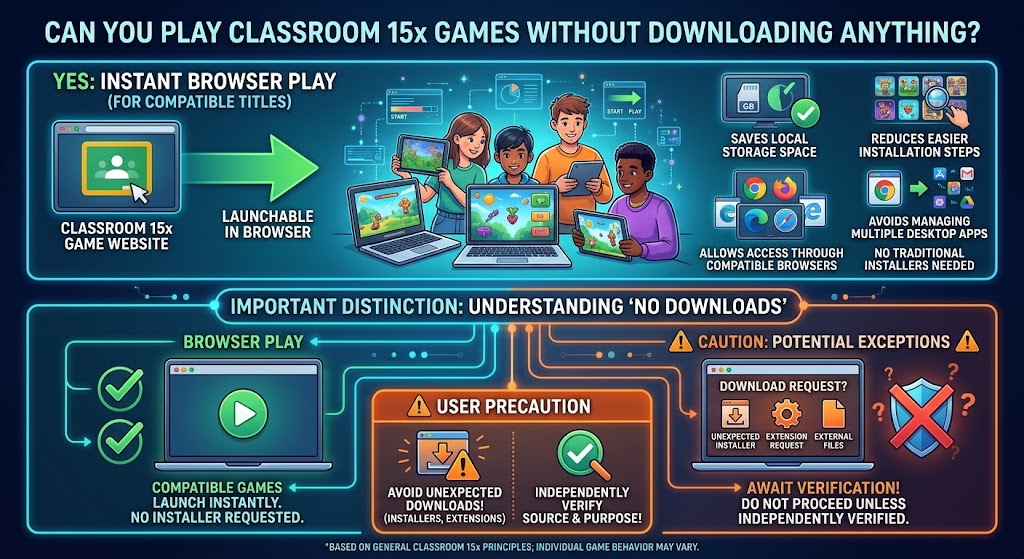
Many games on the platform are presented as browser-based experiences. This means users can launch compatible titles without downloading a traditional game installer.
This approach offers several advantages:
- Saves local storage space.
- Reduces installation steps.
- Makes it easier to explore different games.
- Allows access through compatible browsers.
- Avoids managing multiple desktop game applications.
However, browser-based gameplay does not mean that every game requires no downloads under all circumstances. Avoid any unexpected installer or extension request unless you have independently verified its source and purpose.
Is Classroom 15x Free to Use?
The website presents itself as a free online gaming platform. Visitors can explore its listed games without purchasing a conventional gaming subscription.
However, free access does not automatically mean that every feature is available without limitations.
| Question | Explanation |
| Does the website advertise free games? | Yes, it presents itself as a free gaming website. |
| Is a paid subscription required for basic browsing? | The website advertises free access. |
| Can advertisements appear? | Website pages may contain advertising. |
| Are all games available permanently? | No, game availability can change. |
| Is every game identical across devices? | No, performance and compatibility vary. |
Visitors should read any displayed terms and avoid entering payment information unless they understand exactly what a payment covers.
Which Devices Support Classroom 15x?
Browser gaming provides flexibility because compatible games can run on different types of devices.
The actual experience depends on browser support, available memory, processing power, screen size, and internet speed.
| Device | Potential Compatibility | Important Considerations |
| Windows PC | Good for compatible browser games | Updated browser recommended |
| MacBook | Supports compatible browser games | Check game and browser requirements |
| Chromebook | Supports compatible web games | School administrator restrictions may apply |
| Android phone | Some games support mobile browsers | Touch controls and screen size matter |
| iPhone | Some games support mobile browsers | Safari compatibility varies by game |
| Tablet | Suitable for compatible titles | Check touchscreen support |
A desktop computer may provide better keyboard controls for certain games, while a mobile device may be more convenient for casual titles.
Is Classroom 15x Safe for Students?
Safety deserves attention whenever students use third-party gaming websites.
Classroom 15x describes its platform as suitable for casual access, but a website’s own safety claims should not be treated as independent verification. Its actual safety depends on factors such as advertising, embedded game content, privacy practices, and external links.
Before using the website, consider these precautions:
- Check the complete website address before opening it.
- Avoid clicking suspicious advertisements.
- Never share passwords or personal information.
- Do not install unknown browser extensions.
- Avoid downloading unexpected files.
- Review the privacy policy and terms of use.
- Ask a parent or teacher if you are unsure about a website.
- Stop using a page if it displays suspicious redirects or unwanted pop-ups.
Parents and teachers should also consider the age suitability of individual games. Some categories, especially horror and shooting games, may not be appropriate for younger children.
Does Classroom 15x Work at School?
Many students search for unblocked games because school networks sometimes restrict entertainment websites.
Classroom 15x is presented as an unblocked gaming platform, but that description does not mean it will work on every school network.
Schools can use network filters, DNS restrictions, browser policies, and device-management systems to control internet access.
For example:
- A school may block gaming categories.
- A Chromebook administrator may restrict certain websites.
- Network filters may prevent embedded games from loading.
- School policies may prohibit gaming during lessons.
Students should follow their institution’s rules rather than trying to bypass network restrictions.
The best time to enjoy casual games is during an approved break or outside school hours.
Classroom 15x vs. Traditional Gaming Websites
Browser gaming platforms and traditional gaming websites provide different experiences.
| Comparison | Classroom 15x | Traditional Gaming Platforms |
| Access method | Browser-based | Browser, application, or both |
| Installation | Many titles do not need traditional installation | Some games require downloads |
| Game variety | Focuses on casual browser games | May offer larger commercial libraries |
| Hardware requirements | Depends on the individual browser game | Can range from low to high |
| Gameplay | Often casual and short-session focused | Can include casual and advanced gameplay |
| Cost | Advertises free access | May include free and paid titles |
| Updates | Website and individual game dependent | Depends on the platform and developer |
| Multiplayer | Available only in supported titles | Depends on the service and game |
Neither approach is automatically better. Browser gaming is convenient for quick access, while dedicated gaming platforms may provide more advanced graphics, larger worlds, and additional features.
What Should You Do If Classroom 15x Is Not Working?
Sometimes a game may fail to load, freeze, or display a blank screen.
The problem may come from the website, browser, network, or individual game.
Try these troubleshooting steps:
1. Refresh the page
Reload the browser tab to see whether the game starts correctly.
2. Check your internet connection
A slow or unstable connection can prevent game files from loading.
3. Update your browser
Older browser versions may have compatibility issues.
4. Close extra tabs
Freeing up memory can improve performance, particularly on older computers.
5. Clear browser cache
Cached files may sometimes interfere with loading. Clear the cache if other basic troubleshooting steps do not work.
6. Check browser permissions
Some games require JavaScript or other standard browser features to function.
7. Try another compatible browser
If the game does not work in Chrome, check whether its requirements support Firefox or Safari.
8. Check network restrictions
If you are using a managed school device, the network administrator may restrict access.
Avoid installing unknown software or using suspicious proxy services to force a game to load.
What Are the Best Alternatives to Classroom 15x?
If a particular game is unavailable, other browser gaming platforms may offer similar entertainment.
Here are some established alternatives worth exploring:
| Platform | Main Focus | Best For |
| Poki | Free online games | Casual browser gaming |
| CrazyGames | Browser games across genres | Exploring different game types |
| itch.io | Independent games | Discovering creative indie titles |
| Coolmath Games | Puzzles and casual games | Logic-based entertainment |
| Miniclip | Casual and competitive games | Familiar online gaming experiences |
Each platform has its own content, privacy practices, and advertising policies. Review the website before using it, particularly on a school-managed device.
Tips for Getting a Better Browser Gaming Experience
A few simple habits can make online gaming more enjoyable.
- Choose compatible games: Check the device requirements before launching a title.
- Use an updated browser: Newer browser versions generally provide better compatibility and security.
- Check your connection: Stable internet access helps games load correctly.
- Use appropriate controls: Some games work better with a keyboard, while others support touchscreens.
- Avoid suspicious links: Stick to the intended website and recognizable game pages.
- Manage your time: Take regular breaks instead of playing continuously.
- Respect school rules: Use gaming websites only when permitted.
These steps help reduce common technical problems while keeping online entertainment under control.
Frequently Asked Questions
1. What is Classroom 15x?
Classroom 15x is a browser-based gaming website that offers different types of free online games, including arcade, racing, puzzle, sports, and adventure games.
2. Is Classroom 15x free to play?
Yes, Classroom 15x advertises free access to its online game collection. Visitors can browse available titles without purchasing a traditional gaming subscription.
3. Can I play Classroom 15x on a Chromebook?
Yes, compatible games can run through Google Chrome on a Chromebook. However, school administrator restrictions, browser compatibility, and device settings may affect access.
4. Is Classroom 15x safe for students?
Students should use caution when visiting third-party gaming websites. Avoid suspicious advertisements, unknown downloads, and requests for personal information. Parents and teachers should review game content before allowing access.
5. Do I need to download games from Classroom 15x?
Many games are designed to run directly in a web browser, so traditional installation is not necessary. However, individual game requirements may vary.
6. Why is Classroom 15x not working?
Classroom 15x may not work because of an unstable internet connection, browser compatibility issues, outdated software, or network restrictions. Refreshing the page and updating your browser may help resolve the problem.
Conclusion
Classroom 15x provides a convenient way to explore browser-based entertainment without the usual process of installing large desktop games. Its collection includes several categories, such as arcade, racing, puzzles, sports, adventure, and simulation games. This variety gives casual players different options depending on their interests and available devices.
However, visitors should understand that browser compatibility, website availability, advertisements, and school network restrictions can affect their experience. Parents and students should also review game content and privacy practices before using the platform.
If you enjoy quick browser games, explore the available collection, choose titles that match your interests, and use the website responsibly. A little attention to safety and screen time can make casual gaming a more enjoyable experience.