

Searching for an uploadarticle account can be confusing because different websites use similar UploadArticle names and offer different publishing systems. Some platforms provide a normal registration and login dashboard, while others use an editorial submission process instead.
The safest approach is to identify the exact website first, then follow its current account or contributor instructions. For example, TheUploadArticle.org currently describes an editorial submission process rather than a publicly advertised self-service contributor registration system.
If your goal is to publish an article, the important steps are simple: verify the website, understand its rules, prepare original content, submit it correctly, and keep your contributor information accurate.
Does UploadArticle Require an Account?
Short answer: Not always.
Whether you need an uploadarticle account depends on the specific website you are using. Some publishing platforms allow registered users to upload and manage articles through a dashboard, while others accept submissions by email or a contributor form.
For example, TheUploadArticle.org currently asks contributors to submit their proposed contribution and supporting information through its stated submission process. It says every submission is subject to editorial review and that publication is not guaranteed.
| User goal | Account may be needed? | What to check |
| Read published articles | Usually no | Public website access |
| Submit an article | Depends on platform | Contributor guidelines |
| Manage drafts | Usually yes | Dashboard features |
| Edit profile | Usually yes | Account settings |
| Track submissions | Depends on platform | Submission dashboard |
| Contact editors | Usually no | Contact page or email |
| Publish instantly | Not guaranteed | Editorial policy |
This distinction matters because a search result can point to a similarly named website with completely different registration rules.
How to Find the Correct UploadArticle Website
Before creating an uploadarticle account, check the domain carefully.
Search engines can show several sites using similar words, including variations of “UploadArticle.” A familiar-looking logo or login page does not automatically prove that it belongs to the website you intended to use.
Use this quick checklist:
- Check the complete domain name.
- Look for an About page.
- Read the site’s contributor or publishing guidelines.
- Check the contact information.
- Review the privacy policy and terms.
- Make sure the login page belongs to the same domain.
- Avoid entering passwords on unfamiliar look-alike websites.
This simple check can prevent account confusion and protect your personal information.
How to Create an UploadArticle Account
If the specific UploadArticle platform provides public registration, the process will normally follow a familiar pattern.
Step 1: Open the Correct Website
Start by visiting the exact publishing platform you intend to use. Do not rely on an old login bookmark if you are unsure whether it still belongs to the same service.
Step 2: Find the Registration Option
Look for buttons such as:
- Sign Up
- Register
- Create Account
- Join
- Become a Contributor
The wording can differ between platforms.
Step 3: Enter Your Basic Details
A registration form may request:
- Name
- Email address
- Username
- Password
- Website or profile information
Only provide information that the platform legitimately requests.
Step 4: Verify Your Email
If email verification is required, check your inbox and follow the verification instructions.
If the message does not appear, check your spam or junk folder before requesting another email.
Step 5: Complete Your Profile
A useful contributor profile should clearly explain who you are and what subjects you understand.
Use accurate information rather than exaggerated credentials. Google recommends clear authorship and trustworthy information as part of creating content that demonstrates E-E-A-T.
How to Log In to an UploadArticle Account
After registration, an uploadarticle account normally uses an email address or username and a password.
A typical login process looks like this:
- Open the correct UploadArticle website.
- Select Login or Sign In.
- Enter your registered email or username.
- Enter your password.
- Complete any security verification if requested.
- Open your account dashboard.
If the website does not show a public login option, do not assume that you are missing a hidden page. The platform may use an editorial submission model instead.
For instance, TheUploadArticle.org currently does not advertise a public self-service contributor registration system and directs writers toward its submission process.
What Can You Do After Creating an Account?
The features available inside an uploadarticle account depend on the platform.
A publishing dashboard may allow you to:
- Create articles
- Save drafts
- Submit content
- Edit profile information
- Add an author biography
- Review previous submissions
- Monitor publishing status
- Manage published articles
- Update account information
However, these features should never be assumed to exist on every UploadArticle-branded website.
Always check the actual platform before promising a particular dashboard feature.
How to Upload an Article
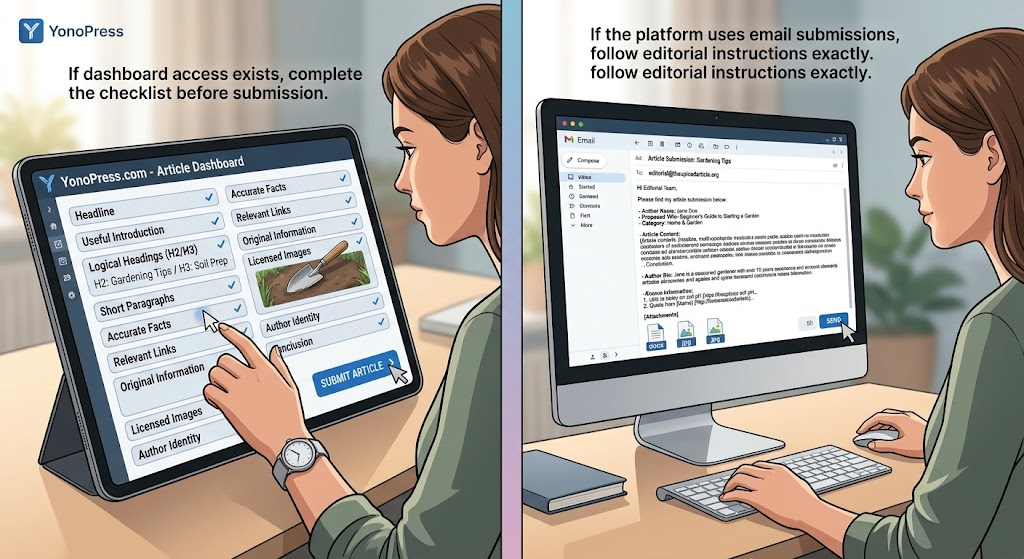
Once you have access to a publishing dashboard, prepare your article before pressing the submit button.
A strong submission should contain:
- A clear headline
- A useful introduction
- Logical H2 and H3 headings
- Short paragraphs
- Accurate facts
- Relevant links
- Original information
- Properly licensed images
- A clear author identity
- A useful conclusion
If the platform uses email submissions instead of an account dashboard, follow the editorial instructions exactly.
For example, TheUploadArticle.org currently asks contributors to provide their name, proposed title, category, completed article or requested material, author bio, and relevant source information where appropriate.
What Makes an Article More Likely to Be Accepted?
Creating an uploadarticle account does not automatically make an article publishable.
Editors want content that serves readers first. A strong article should answer a real question, stay focused, use accurate information, and provide enough detail to help the reader take the next step.
TheUploadArticle.org specifically says submissions can be accepted, returned for revisions, sent back for clarification or sources, or declined depending on their quality and suitability.
Before submitting, ask:
- Is the article original?
- Does it answer the reader’s question?
- Are important claims supported?
- Are the links relevant?
- Does the article fit the site’s audience?
- Are the images legally usable?
- Is the author information accurate?
- Does the article offer something useful beyond basic summaries?
These checks can improve both editorial quality and search usefulness.
How to Optimize an UploadArticle Account for SEO
SEO should support the reader instead of controlling the writing.
Google’s Search Essentials recommends creating helpful, reliable, people-first content and using words that searchers naturally use in prominent parts of a page.
For an uploadarticle account, focus on the quality of your published work rather than repeating the same keyword throughout your profile.
Useful SEO practices include:
- Choose one clear search intent.
- Write a descriptive title.
- Use the primary keyword naturally.
- Add related terms where they make sense.
- Organize information with headings.
- Link to trustworthy sources.
- Use descriptive anchor text.
- Keep paragraphs easy to scan.
- Answer important questions directly.
- Update outdated information.
Google also notes that its language systems can understand related search queries without requiring creators to insert every keyword variation into a page.
How to Use E-E-A-T the Right Way
E-E-A-T stands for Experience, Expertise, Authoritativeness, and Trustworthiness.
Google explains that E-E-A-T itself is not a single ranking factor. Instead, its systems use a variety of signals to identify content that demonstrates qualities associated with helpful and trustworthy information.
You can strengthen these signals by:
- Showing a real author name.
- Providing an accurate author bio.
- Linking to relevant background information.
- Supporting important claims with reliable sources.
- Demonstrating first-hand experience where appropriate.
- Correcting factual errors.
- Keeping information current.
- Avoiding fake qualifications.
Trust is especially important. Never create fictional credentials simply to make an article appear more authoritative.
UploadArticle Account vs. Guest Posting
An uploadarticle account and a traditional guest-posting arrangement are not necessarily the same thing.
A contributor account can provide access to a publishing system, while guest posting may involve pitching an article directly to an editor.
| Feature | Contributor account | Guest post submission |
| Registration | May be required | Often not required |
| Dashboard | Possible | Usually unavailable |
| Article pitch | Sometimes | Common |
| Editorial review | Depends on platform | Common |
| Author bio | Often possible | Often possible |
| Instant publication | Not guaranteed | Rare |
| Article management | Possible | Usually handled by publisher |
Always read the platform’s current rules instead of assuming that every publishing website works like a social network.
Can an UploadArticle Account Help With Backlinks?
Publishing an article can sometimes generate referral traffic or provide an opportunity for a relevant link, but a link should never be the only reason for publishing.
Google’s people-first guidance warns against creating content primarily to manipulate search rankings. It also emphasizes originality, completeness, and meaningful value for readers.
A useful article should therefore stand on its own even if the reader never clicks the author link.
Use links when they help readers:
- Verify a claim
- Find an official resource
- Understand a technical term
- Explore a related topic
- Visit the author’s genuinely relevant website
Avoid unrelated commercial links, excessive anchors, and pages created only to obtain backlinks.
What Should You Avoid When Using UploadArticle?
A successful uploadarticle account should support useful publishing, not low-quality mass submissions.
Avoid these common mistakes:
1. Copying Existing Articles
Do not copy another publisher’s structure and simply replace a few words. Google encourages original information and meaningful added value rather than superficial rewriting.
2. Keyword Stuffing
Repeating the same phrase again and again makes content harder to read.
Use natural language and related concepts instead.
3. Fake Author Credentials
Never claim qualifications, employment, awards, or experience that you do not have.
4. Irrelevant Links
A link should help the reader. If removing the link would make the article just as useful, reconsider whether it belongs there.
5. Thin Articles
A short article is not automatically bad, but it should completely answer its intended question.
6. Mass Publishing
Publishing dozens of near-identical pages can create a poor user experience. Google’s current guidance emphasizes valuable, non-commodity content and warns against creating large volumes of pages primarily to manipulate search visibility.
What Happens After You Submit an Article?
The process depends on the platform.
For an editorial publication, your article may go through several stages:
Submission → Editorial review → Revision request or approval → Publication
TheUploadArticle.org states that submissions can be accepted, returned for revisions, or declined. It also says submission does not guarantee a publication date, traffic level, search ranking, or a particular link attribute unless separately agreed in writing.
This is an important expectation for writers and marketers.
A quality article can improve your chances of acceptance, but no legitimate publisher can promise a Google ranking simply because an article has been submitted.
How to Fix UploadArticle Login Problems
If your platform provides an account login and you cannot access it, try these steps:
- Confirm that you are using the correct domain.
- Recheck your email or username.
- Reset your password if the option is available.
- Check your inbox for account verification messages.
- Look in your spam folder.
- Try a private browser window.
- Clear outdated browser data.
- Contact the platform through its official support channel.
Do not send your password to an editor or support representative.
If you are using TheUploadArticle.org, its contact page provides a form for article questions, factual corrections, technical issues, and editorial inquiries.
How to Protect Your UploadArticle Account
Account security is simple but important.
Use a unique password that you do not reuse on other websites. If the platform supports additional security features, enable them.
You should also:
- Keep your email account secure.
- Never share your password.
- Avoid logging in through suspicious links.
- Check the domain before entering credentials.
- Do not send passwords through contact forms.
- Remove old sessions from shared computers.
- Keep recovery information current.
If a website asks for unusual sensitive information that is not necessary for publishing, stop and verify the request before continuing.
UploadArticle Account: Quick Comparison Guide
The following table helps match the right approach to your goal.
| Goal | Best approach | Key action |
| Read articles | Public website | Browse categories |
| Become a contributor | Contributor guidelines | Check requirements |
| Publish content | Submission system | Prepare original article |
| Manage drafts | Account dashboard | Save and edit content |
| Build author credibility | Complete profile | Use accurate bio |
| Earn referral traffic | Useful publishing | Create audience-focused content |
| Build SEO value | High-quality article | Focus on relevance and usefulness |
| Fix account access | Support/recovery | Use official channels |
| Submit sponsored content | Publisher policy | Confirm commercial rules first |
| Build long-term authority | Consistent expertise | Publish genuinely useful work |
Is UploadArticle Good for SEO?
It can be useful, but publication alone does not guarantee SEO results.
The real value depends on the quality of the publication, relevance of the article, usefulness to readers, indexing, link quality, and the overall authority of the website.
Google’s Search Essentials clearly states that meeting its technical requirements and best practices does not guarantee crawling, indexing, or ranking.
That means you should judge a publishing opportunity on more than domain metrics.
Consider:
- Audience relevance
- Editorial standards
- Originality
- Search visibility
- Content quality
- Link policies
- Publisher reputation
- Whether the article provides genuine reader value
Frequently Asked Questions
1. What is an UploadArticle account?
Short answer: It refers to a contributor or user account associated with an UploadArticle publishing platform.
Depending on the website, the account may allow users to submit articles, manage profiles, track submissions, or access publishing tools.
2. How do I create an UploadArticle account?
Short answer: Use the registration system provided by the exact UploadArticle website you intend to use.
Some sites offer public registration, while others use an editorial submission process. Check the site’s current contributor instructions before entering your information.
3. Can I submit an article without an UploadArticle account?
Short answer: Yes, on platforms that accept direct editorial submissions.
For example, TheUploadArticle.org currently provides contributor instructions that allow writers to submit material through its stated editorial process rather than relying on public self-service registration.
4. Does having an UploadArticle account guarantee publication?
Short answer: No.
Account access or submission does not automatically mean an article will be published. The publisher may review the content, request changes, ask for sources, or decline the submission.
5. Can an UploadArticle account improve SEO?
Short answer: It can support a broader content strategy, but it does not guarantee higher rankings.
SEO value depends on the quality and relevance of the published content, the website’s visibility, links, audience, and many other factors. Google does not guarantee rankings simply because content meets basic Search Essentials.
6. What should I do if I cannot log in to my UploadArticle account?
Short answer: First verify the website domain and your login details, then use the platform’s official password-recovery or support process.
Avoid entering your credentials into a login page reached through an unfamiliar link. If the platform does not offer public account login, check whether it uses an editorial submission model instead.
Conclusion
An uploadarticle account can be useful when you want to publish, manage, or submit written content, but the exact process depends on the website behind the name. The most important first step is to verify the domain and read its current publishing rules.
For writers, the strongest strategy is straightforward: create original material, answer real reader questions, use accurate sources, maintain honest author information, and follow the publisher’s editorial requirements. Google likewise emphasizes helpful, reliable, people-first content rather than pages created mainly to manipulate search rankings.
If you are preparing an article for publication, treat the submission as an opportunity to demonstrate genuine knowledge not simply as a way to obtain a link. That approach creates stronger content, builds reader trust, and gives your publishing efforts a better long-term foundation.